Do you write your thoughts in the “create” page right away in blogspot? In writing a post for my blogs, I use MS Word to see my grammar, word spelling, and word counting. When you do some sponsored reviews---advertisers require us to make 50-300 words. To check word count, go to “Tools” in the Menu bar and then click word count. Right now, I typed 123 words all in all. After you’re done, just do the copy and paste method. I simply use Ctrl A- to highlight the whole article, then Ctrl C for copy and then Ctrl V for paste. By using MS Word, you can do your job easier and faster.
Showing posts with label computer. Show all posts
Showing posts with label computer. Show all posts
Thursday, June 23, 2011

Friday, February 13, 2009
Secure websites
We all know that some sites are not safe. But the question is how can we tell if certain website is safe. Spyware are really rampant on the net. In my own case, I'm always careful in browsing the net especially when I do iconfidential transactions, like using my credit card, paypal and the like. I am very careful in sending my personal information like your bank account numbers, credit card numbers, social security numberand password to any site. However, take note that secure websites safe your private information by using encryption and some authentication standards. Look for a small lock icon on the task bar when we open any secure site and a secure site should always start a domain name with https\\ and padlock icon. Then, you are safe!
Bad File Extensions
Nowadays, malware cases are increasing in numbers. We can't stop these crooks but we can avoid them. We should be careful with Email attachments and downloading some software from the net. Take note of the following extensions that might harm your computer:
.scr - Windows Screen Saver - USE CAUTION if you receive a screen saver via email. They can contain worms or viruses
.pif - DO NOT OPEN! This is most likely a virus. Clicking it will run a program or code that can mess up your computer.
.exe - executable file - a program that contains a virus, Trojan horse, or worm
.pps - MS PowerPoint (can contain macro virus)
.zip - Zip (compressed) file
.vbs - Visual Basic script
.bat - Executable MS-DOS batch file
.com - DOS executable command
.asp - active server page - internet script
.doc - Word document (can contain macro virus)
.xls - Excel file (can contain macro virus)
These file extensions tell you what kind of programs. Most Anti-virus nowadays stops, or at least warns you of high risk attachments. But don't depend too much on anti-virus. You just have to be careful and alert at all times.
.scr - Windows Screen Saver - USE CAUTION if you receive a screen saver via email. They can contain worms or viruses
.pif - DO NOT OPEN! This is most likely a virus. Clicking it will run a program or code that can mess up your computer.
.exe - executable file - a program that contains a virus, Trojan horse, or worm
.pps - MS PowerPoint (can contain macro virus)
.zip - Zip (compressed) file
.vbs - Visual Basic script
.bat - Executable MS-DOS batch file
.com - DOS executable command
.asp - active server page - internet script
.doc - Word document (can contain macro virus)
.xls - Excel file (can contain macro virus)
These file extensions tell you what kind of programs. Most Anti-virus nowadays stops, or at least warns you of high risk attachments. But don't depend too much on anti-virus. You just have to be careful and alert at all times.
Wednesday, September 24, 2008
Professional Web design
Designing a web site takes a lot of time and effort. You have to know html and stuff like that. You have to develop a skill to do that. That’s one of the things I would like to know about my blog. I really want build and design my blog. But I am very busy doing some other things. Maybe one of these days, I could spare time learning html. I found a site, where they design websites – they do everything for you. It is good for those who don’t have to design and build their own website. I am glad that they have this kind of concept. The site that I was talking about is Networksolutions.com.
Network Solutions has been serving many customers. They are expert in Web 2.0 design standards. They have professional, skillful and experienced graphic designers that will create, design, do copywriting, and develop your website. How? You discuss with the graphic designers what do you want for your website. Then, they generate it according to your preference and make a professional web design that is accessible and attractive to consumers. They have web site design packages for you to choose from at reasonable prices. They deliver search engine friendly websites. For more details, look into their site.

Network Solutions has been serving many customers. They are expert in Web 2.0 design standards. They have professional, skillful and experienced graphic designers that will create, design, do copywriting, and develop your website. How? You discuss with the graphic designers what do you want for your website. Then, they generate it according to your preference and make a professional web design that is accessible and attractive to consumers. They have web site design packages for you to choose from at reasonable prices. They deliver search engine friendly websites. For more details, look into their site.
Tuesday, September 16, 2008
Trusted Internet
We should protect our computer from malware and hackers. Internet is not really a safe place if you don’t have enough shields to protect your computer. I was very glad that the modern technology has developed solutions and applications to shield our computer. However, in this matter, many people think that Comodo has array of Trusted Internet solutions and applications which are rated as the top business solutions.
Comodo offers new technologies such as HackerProof and SSL certificate ideal for online business, Firewall that was proven to have the highest level of "anti-leak" protection, anti-malware, website authentication, anti-virus, and email security certificate. All these products can be downloaded free. There is no renewal or update fee. They also feature Identity Protection in which the second largest certification authority for ensuring Identity Trust & Assurance on the web. It is great to have Trusted Internet solutions such as Comodo. To know about Comodo products and services, look into their site--- comodo.com and read Melih Abdulhayoglu's blog.
Comodo offers new technologies such as HackerProof and SSL certificate ideal for online business, Firewall that was proven to have the highest level of "anti-leak" protection, anti-malware, website authentication, anti-virus, and email security certificate. All these products can be downloaded free. There is no renewal or update fee. They also feature Identity Protection in which the second largest certification authority for ensuring Identity Trust & Assurance on the web. It is great to have Trusted Internet solutions such as Comodo. To know about Comodo products and services, look into their site--- comodo.com and read Melih Abdulhayoglu's blog.
Thursday, August 28, 2008
Best web host in the marketplace today
It is great to research about the products that you are interested in before leaping into purchasing decision. I am quite conservative in this matter. I always want to make sure that I got the best deal. In my blogging experience, looking for the right web hosting takes a lot of work and time. I really have to research more and ask my friends about their web-hosting providers. It is nice to know and learn about certain web-hosting provider first before you avail of their services. In addition to this--- there is a site, which has valuable and unbiased reviews on different web hosting providers. The site is webhostingrating.com. This site has a list of webhosting rating, best deal hosting, best blog hosting, best email hosting, best ecommerce hosting and many others. Their rating and ranking are based on customers’ satisfaction, price, consistency, and technical support. I really like how they rate each popular webhosting according to customer satisfaction and price. The first 5 best web hosts are Inmotion, Bluehost, Webhosting Pad, Globat, and Yahoo. Moreover, at this site, you will find informative articles about registering and securing multiple domains—the benefits of purchasing multiple domains. So, before you get any web host, check out Webhostingrating.com first.

Tuesday, August 26, 2008
Digital photo frames
I was planning on buying a digital photo frame. I would like to give it to my mom-in law for this coming Christmas. I always like the look of it. It is nice to see photos moving in the frame. Digital photo frame is a picture frame that displays digital photos without the need to print them or use a computer. However, I found a site that carries different styles of digital photo frame (see photo shown below) at great discounted prices. The site that I was talking about is called, DigitalFramez.com.au. Digital photo frames are very popular nowadays. A lot of people have it in their households. You don’t have to print out some photos for this frame. How do you put pictures on the digital frame? Simply, use a digital camera for taking photos. Then, transfer your memory card into the digital photo frame. Then a slideshow will appear. You can choose your favorite slideshow using remote control. The nice thing about digital photo frame is it holds a lot of pictures and is very decorative.
I’d like to buy a 10 inch digital frame, they have a huge sale now for more than 50% off. Digital Framez ships worldwide. So, for quality, durable and stylish digital frames, Digital Framez is the place to go. For more details, visit their site.

Tuesday, August 05, 2008
Call The Geeks for computer troubles
If you have problems with your computer, call the Geeks to help you out with the computer repair and troubleshooting. CallTheGeeks.com is the ultimate solution to computer problems for small businesses, offices and homes. It offers telephone and online technical support service. That means you can either talk to them on the phone or chat with them online at reasonable flat fee. They have certified and professional IT to solve your computer problems. All you have to do is describe your problem and a computer geek or expert will be there to help and serve you. Therefore, for computer troubles, don’t forget to Call The Geeks.
Browsers updates will come out soon to fight malware sites
Firefox version 3, Opera 9.5 and Internet Explorer add new features that block malware sites. I can't wait to upgrade my Firefox browser and Internet Explorer. Actually, I use Yahoo search sometimes when I am in doubt and meticulous about sites that I am looking for. Yahoo search a feature that detects malware sites. Yahoo search engine is tied up with McAfee. Google search engine also blocks phishing sites. I was glad that these search engines help us fight against malware or bad sites.
Wednesday, July 30, 2008
Clean out and Clean up your computer
Do you always clean out and clean up your files in your computer? We all know that the more we use our computer, the junk we collect files that take up space in our disk. It is advised to regularly clean out our system. By doing so, it makes our computer run faster. Here are the ways to clean out our computer:
Actually, you can do it by doing Disk Clean up. And after you cleaned up, do Disk Defragment that arrange files on your Hard Disk.
- Delete files in the Recycle bin
- Remove Temporary Files in your browser and computer
Actually, you can do it by doing Disk Clean up. And after you cleaned up, do Disk Defragment that arrange files on your Hard Disk.
Thursday, July 24, 2008
Keeping my pc safe online
I always make sure that I keep my pc safe online. Hackers are rampant nowadays. To keep my pc safe online---I update Windows a least once or twice a month to get the latest updates from Microsoft. I have Firewall, Windows Security Alert. I heard about Zone Alarm that prevent programs from accessing the Internet without your permission, and block access to your PC from intruders. I don't have Zone Alarm but I would surely download it in one of these days. I check for spyware and virus. I browse more safely by using Firefox which blocks pop up ads and to be doubly sure, I use Yahoo search sometimes because it scans bad sites using Mcafee features.
Monday, July 07, 2008
Fund Accounting Software
 A small, medium and large non-profit organization has a lot of responsibility in terms of accounting. I am amazed by today’s technology; there are accounting software for private businesses and software that is especially and exclusively designed for non-profit organizations. The JMT Consulting Group comes up with a Fund Accounting Software solutions for non-profit organization thus; help them in making right decisions for individual or group needs. In the non-profit organization, there is complexity in terms of finances. There are many divisions involved. I remember when I used to work in the non-profit organization years ago, I noticed how complicated the accounting was without proper organization and classifications. With JMT’s Nonprofit Fund Accounting Software; it will make many non-profit organizations run their group faster and easier. Especially, when a non-profit group is planning on having a fundraising project. This is a serious and vital matter to tackle with. However, JMT also have an innovative solution for the matter, Fundraising Software and will assist you all the way through the whole route in accomplishing this fundraising objective. JMT consists of expert project managers, system analysts, trainers, accountants, and consultants that have been serving non-profit groups to achieve their missions and goals. For more details, look up their website and learn about this consulting group and their software.
Thursday, July 03, 2008
Asahi, bartender Robot
Asahi Beer has researched and tested robot bartenders for the past years. However, it looks like it is done with their new Mr. Asahi bartender robot. The robot was built in full six months fine-tuning its bar tending skills and able to serve customers in less than two minutes. That sounds like it has the expert bartender skills. Check out this video I captured from Channel Flip.
Thursday, June 26, 2008
Customize tabs in Firefox
I really like usi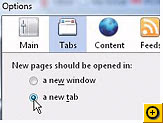 ng Firefox in browsing and surfing the net. I can keep and set tabs all together in one window unlike Internet Explorer. IE also has that feature but you always have to do right click before you open a link. It is annoying and time consuming. FF is more customizable than IE anyways. If you would like to open another window, you just have to go to "File" then lick Open new tab or Ctrl T. You may customize your browser by going to Tools then Options and click Tabs. Choose "Open a new tab" for New pages should be opened in.
 ng Firefox in browsing and surfing the net. I can keep and set tabs all together in one window unlike Internet Explorer. IE also has that feature but you always have to do right click before you open a link. It is annoying and time consuming. FF is more customizable than IE anyways. If you would like to open another window, you just have to go to "File" then lick Open new tab or Ctrl T. You may customize your browser by going to Tools then Options and click Tabs. Choose "Open a new tab" for New pages should be opened in.
Screensavers
Screensavers were first created to protect a computer monitor from phosphor burn-in. Early monitors had problems with the same image being displayed over and over for long periods of time. The phosphors, used to make the pixels in the display, glow at a constant rate for such a long period of time that they could discolor the glass surface of the monitor. This discoloration could be visible as a faint image overlaying whatever else was shown on the screen. Advances in technology and the creation of energy-saver monitors have virtually eliminated the need for screensavers.
Having said that, most of us still use screensavers. The most common reason is for entertainment, they just look good, however, you can also use a screensaver for security. Some screensavers can be set up with a password so you can walk away from computer and know it is safe. That's why it is called screensavers.
Wednesday, June 25, 2008
Speed up internet browser
I have been wondering why my internet browser (Firefox) is slow in surfing the net. So, I researched and found out some ways to speed up browsing feature. If you experienced the same thing as I had, then your problem will be solved. Because it worked out with me. For Firefox users, go to "Tools" and then click "Add-ons. Disabled whatever add-ons you have there. Then reset your browser or you may close your browser then open another one. If this doesn't work for you, scan for virus. You pc might be infected with virus. You will see the difference!
Thursday, June 19, 2008
Internet Cookies
When you are browsing your internet the web server placed some text files on your computer as cookies. The main purpose of cookies to save your preferences that you specify for future reference. You can enable or disable your computer web browser cookies. But it is important for you if you disable your browser cookies, may be some website will not work properly.
If you are using Internet Explorer 6.x and later then follow the given steps to enable or disable cookies.
-
Open Internet Explorer, click on the Tools then Internet Options.
-
Click on Privacy tab from the left top of dialog box and click on Advanced button.
-
To enable the cookies, select the Accept option and for disable check the option Override automatic cookies handling then click on block.
-
Now restart the browser to execute changes.
Monday, June 16, 2008
Great cash back rewards
Don’t you know that you can get $20 cash back when your purchase an AT&T prepaid plan? This deal includes free cell phone and no contract at all! Do you want to know how to avail of this opportunity? Well, there are many deals over the net today like coupons and discounts. But cash back offers are always the best. DealKing.com offers best cash back rewards you could ever find in the net today. It is a compare prices search engine where you can find stores that offer hot deals and promotions on certain products. It helps you find and compare prices on certain item. Thus, when shopping online, take DealKing.com as your no. 1 reference.

Online Shopping tips
Do you shop online? Do you enjoy shopping online? Shopping can be really fun, you have the great and huge selections of different products. If so, here are my tips:
- Check out the seller. If you’re thinking about shopping on a site with which you’re not familiar, do some independent research before you buy. Read the site’s privacy policy to learn how it uses and shares your personal information.
- Shop at Secure Web Sites. How can you tell if a web site is secure? It uses encryption technology to transfer information from your computer to the online merchant's computer. Encryption scrambles the information you send, such as your credit card number, in order to prevent computer hackers from obtaining it en route. The only people who can unscramble the code are those with legitimate access privileges. Look for websites that have a secure way of paying (known as an encryption facility) - these show a padlock at the bottom of the screen when you are filling in the payment details.
Research the Web Site before You Order
- Secure your computer. At a minimum, your computer should have anti-virus and anti-spyware software, and a firewal
- Compare prices: Search for the same toy on various different sites to find where you can get the lowest price.
- Lowest shipping charges: While shopping online, you do have to pay shipping charges on most sites which are calculated after you checkout.
- Discount Coupons: Keep an eye open for discount coupons either listed on the seller’s website itself, or elsewhere on the internet.
- Keep a paper trail. Print and save records of your online transactions, including the product description and price, the online receipt, and copies of any email you exchange with the seller.
- Turn your computer off when you’re finished shopping. Many people leave their computers running 24/7, the dream scenario for scammers who want to install malicious software on your machine and then control it remotely to commit cyber crime. To be extra safe, switch off your computer when you are not using it.
Subscribe to:
Posts (Atom)